
Originally planned as a single post, it was getting a little large so its been split into two parts. They’re both focused on theory but don’t let that put you off; I’ve really enjoyed writing them so hopefully you’ll enjoy reading them! It can really help to know how things are operating under the hood before we add additional complexity to our deployments.
There’s a lot in here so don’t worry if some things don’t make complete sense - right now, knowing of these concepts is the main goal.
What are data types?#
When we create resources using Terraform usually some information has to be provided, such as resource names and configuration details for your deployment. Most programming languages have a type system which allows you to declare that these pieces of information should be a certain type, such as number (e.g. number_of_virtual_machines = 3), and trying to assign it a value that isn’t a number should cause an error.
Data types (or just types in most conversations) are a useful feature to validate the information being received adheres to certain rules before executing code or deploying the Terraform.
The table below shows some of the more common types available within Terraform. Note the data type column are not types you can assign to a variable, they are the grouping term for the attribute types in the next column.
| Data type | Attribute types | Declare with | Example |
|---|---|---|---|
| Primitive | - string- bool- number | - ""- n/a - n/a | "some text"false23 |
| Complex - Collection | - list- map- set | - []- {}- [] | See Complex collection |
| Complex - Structural | - object- tuple | - {}- [] | See Complex structural |
As long as you have the Terraform extensions installed, triggering the auto-complete/intellisense on the type portion of a variable block should show a list of type constructors like this:
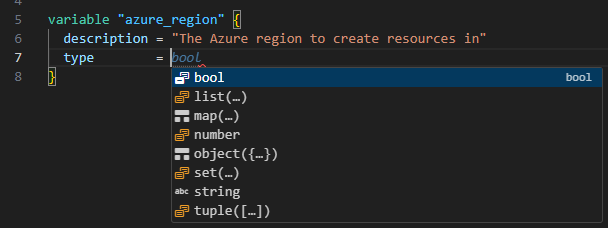
If you’re after more detail I highly recommend the HashiCorp docs on types and type constraints
What about keys and values?#
Key-value pairs might also be referred to as dictionaries, hash maps, or just maps; in general conversation it’s unlikely to be too pertinent so establish some shared understanding for yourself and others then crack on.
Key-value pairs are just "some_text" = "some_value" - that’s it. Here’s some more examples in a Terraform locals block:
locals {
    fruit               = "apple"
    charlotte = {
      favourite_food  = "sandwiches"
    }
}
The key is the part on the left, the value is the part on the right. The key must always evaluate to a string type, though the value can be any supported attribute type that we saw in the table above.
Within the Terraform code, you can reference the value of these keys by using local.<key_name>, or if there’s sub items local.<key_name>.<key_name>, for as many keys as you need to.
E.g. using local.fruit will return the value "apple". Using local.charlotte["favourite_food"] will return "sandwiches". Using the [] syntax is a standard way to refer to keys, we’ll see more of that later.
Types (of types)#
Good thing this isn’t confusing at all! When it comes to how things are typed in Terraform there’s two methods, and using language agnostic terms they are explicit (directly express something) and implicit (something is assumed/suggested/inferred).
Type constraints (explicit)#
Type constraints or type enforcements are the Terraform terms for the general concept of strong typing, which may also be referred to as explicit typing, static typing, and many others; they all refer to similar practice of specifying what kind of data variables can accept.
Within Terraform variable blocks you can declare type constraints using type constructors which helps you set out rules for what kind of data you will allow into the variable. This can be done using the type attribute, such as:
variable "some_boolean_variable" {
  type    = bool
  default = 23
}
This variable type is bool, which means it can only accept one of true, false, "true", or "false" as a value. Attempting to run a terraform validate over this code will give an error like the below because we are attempting to assign an incorrect value given the specified type constraint:
│ Error: Invalid default value for variable
│
│ on xx.tf line xx, in variable “some_boolean_variable”:
│ xx: default = 23
│
│ This default value is not compatible with the variable’s type constraint: bool required, but have number.
If you thought the "true"/"false" values being allowed on a boolean type was odd, good catch! This is because Terraform’s automatic type conversion is being sneaky and converting values. Terraform will convert a string value of "true"/"false" to the boolean value true/false.
Inferred types (implicit)#
In contrast to strong types, an inferred type is when Terraform makes a best effort guess as to what the data type might be. A quick reminder for the examples below that in a locals {} block, values are on the left side of the = and the expressions are on the right side.
locals {
  some_number = "23"

  todo_list = ["acquire snacks", "prepare snacks", "eat snacks"]

  permissions_object = {
    admin = {
      name = "Alice"
      age  = 30
    }
  }
}
Terraform will set these value types as:
some_numberwill be astringtype because the expression is enclosed in double quotes ("") which indicates a stringtodo_listwill be a typetuple([string, string, string,])and not alist(string)because we have wrapped the expression in square brackets[]which declare eitherlists,tuples, orsets- more on this laterpermissions_objectwill be anobject({...})type because we have declared it using the curly braces{}which declareobjectsormaps
If you’re wondering if this behaviour is taking some liberties and you would prefer to set what kind of types you’re working with, there is hope! Enter the Terraform type conversion functions!
These allow you to inform Terraform what the type should be instead of letting it guess - let’s apply them to the previous local values:
locals {
  some_number = tonumber("23")

  todo_list = tolist(["acquire snacks", "prepare snacks", "eat snacks"])

  permissions_object = tomap({
    admin = {
      name = "Alice"
      age  = 30
    }
  })
}
So we’ve made use of the tonumber(), tolist(), and tomap() type conversion functions which now mean:
some_numberwill be anumbertodo_listwill be alistpermissions_objectwill be amap(object({...}))
In isolation this might sound a bit dull, but it’s really useful (and interesting!) once you start declaring and transforming more complex objects.
Complex collection#
Now that we’ve rounded out a bit of theory on data types and setting constraints, lets look at some typed variable blocks. I’ll also display the JSON version, as I found this really helps wrap my head around data as it gets a bit more complex (especially when we start looking at loops/iterations).
Lists#
Some neat facts about lists are:
- They’re ordered, which means moving the position of items might trigger a deployment change
- They can contain duplicate values,
["bob, "bob", "bob"]will be treated as 3 elements - All values must be the same type, as an example you can’t have a list which contains
stringsandobjects - Lists can be joined together using the concat() function
- List values can be accessed using:
- index lookup syntax:
var.my_list[<index number>] - element() function lookup:
element(var.my_list, <index number>)
- index lookup syntax:
Check out these examples to see what basic list variables look like:
Example 1 - list of strings
variable "list_string_variable" {
  type        = list(string)
  description = "A list of items to purchase from the shop."
  default     = ["beans", "ice-cream", "oats"]
}
and it’s JSON representation:
[ "beans", "ice-cream", "oats" ]Examples of accessing values for var.list_string_variable:
var.list_string_variable[0]would returnbeanselement(var.list_string_variable, 1)would returnice-cream
Example 2 - list of objects
variable "list_object_variable" {
  type = list(object({
    name = string
    age  = number
  }))
  description = "A list of people."
  default = [
    { name = "Pradeep", age = 30 },
    { name = "Sertan", age = 25 },
    { name = "Anya", age = 28 }
  ]
}
and it’s JSON representation:
[
  { "name": "Pradeep", "age": 30 },
  { "name": "Sertan", "age": 25 },
  { "name": "Anya", "age": 28 }
]
Examples of accessing values for var.list_object_variable:
var.list_object_variable[0].namewould returnPradeepelement(var.list_object_variable, 1).namewould returnSertan
Maps#
I think maps are great - I’m confident you will come to love them also. Some neat facts about maps are:
- They have no guaranteed order - it’s a feature not a bug; if you need to preserve order, use a
list - Maps always have keys, and keys are always strings
- Maps can be merged together using the merge() function
- Map values can be accessed using:
- key reference syntax:
var.my_map["key"] - lookup() function:
lookup(var.my_map, "key", "default_value_if_key_not_found")
- key reference syntax:
Check out these examples to see what basic map variables look like:
Example 1 - map of strings
variable "resource_tags" {
  type        = map(string)
  description = "A map with string keys and values"
  default = {
    owner       = "team-a"
    cost_centre = "123"
    env         = "test"
  }
}
and it’s JSON representation:
{
  "owner": "team-a",
  "cost_centre": "123",
  "env": "test"
}
Examples of accessing values for var.resource_tags:
var.resource_tags["owner"]would returnteam-alookup(var.resource_tags, "cost_centre", "000")would return123if present (and000if not)
Example 2 - map of objects
variable "virtual_machines" {
  type = map(object({
    size     = string
    os       = string
    region   = string
  }))
  description = "A map of virtual machines to create."
  default = {
    web_server = { size = "small", os = "ubuntu", region = "uk south" }
    db_server  = { size = "large", os = "ubuntu", region = "uk south" }
    dev_box    = { size = "small", os = "windows", region = "uk west"  }
  }
}
and it’s JSON representation:
{
  "web_server": { "size": "small", "os": "ubuntu",   "region": "uk-south" },
  "db_server":  { "size": "large", "os": "ubuntu",   "region": "uk-south" },
  "dev_box":    { "size": "small", "os": "windows",  "region": "uk-west"  }
}
Examples of accessing values for var.virtual_machines:
var.virtual_machines["web_server"].sizewould returnsmalllookup(var.virtual_machines, "dev_box", "unknown").oswould returnwindowsif present (andunknownif not)
Sets#
Sets might not be something you reach for all the time, but given their unique behaviour it’s great to know that some neat facts about sets are:
- They are unordered and automatically remove duplicate values -
["bob", "bob", "bob"]will become just["bob"] - Set values cannot be accessed directly, you cannot use
var.my_set[0]like you would with alisttype- Accessing a specific value requires iterating over it with a
for_each, or using atolist()type conversion function such astolist(var.my_set)[0]- special quirk here, index 0 may not be what you think it is - check out the example to see why.
- Accessing a specific value requires iterating over it with a
- Sets can be merged together using the setunion() function
settypes require all attribute values to be known at theplanstage so may not be suited for anything that would only resolve during anapply
Here’s one basic example for a set variable:
Example - set of strings
variable "set_string_variable" {
  type        = set(string)
  description = "A set of strings"
  default = [
    "gamma"
    "alpha"
    "beta"
  ]
}
and it’s theoretical JSON representation:
[ "alpha", "beta", "gamma" ]Examples of accessing values for var.set_string_variable:
tolist(var.set_string_variable)[0]would returnalpha
Wait, why did you say theoretical JSON representation there and why would index 0 return alpha, shouldn’t it be the first item, gamma?
Remember sets are unordered, and lists are ordered. When the set is converted to a list it is sorted lexicographically which for right now, means alphabetically. So the converted list order becomes ["alpha", "beta", "gamma"] and index 0 returns alpha.
Complex structural#
Objects#
I love object. Some neat facts about objects are:
- They allow you to declare a data structure!
- Objects can be merged together using the merge() function
- Object values can be accessed using:
- dot notation:
var.my_object.attribute
- dot notation:
The autocomplete can look like this when declaring the variable in a *.tfvars file - pretty neat!
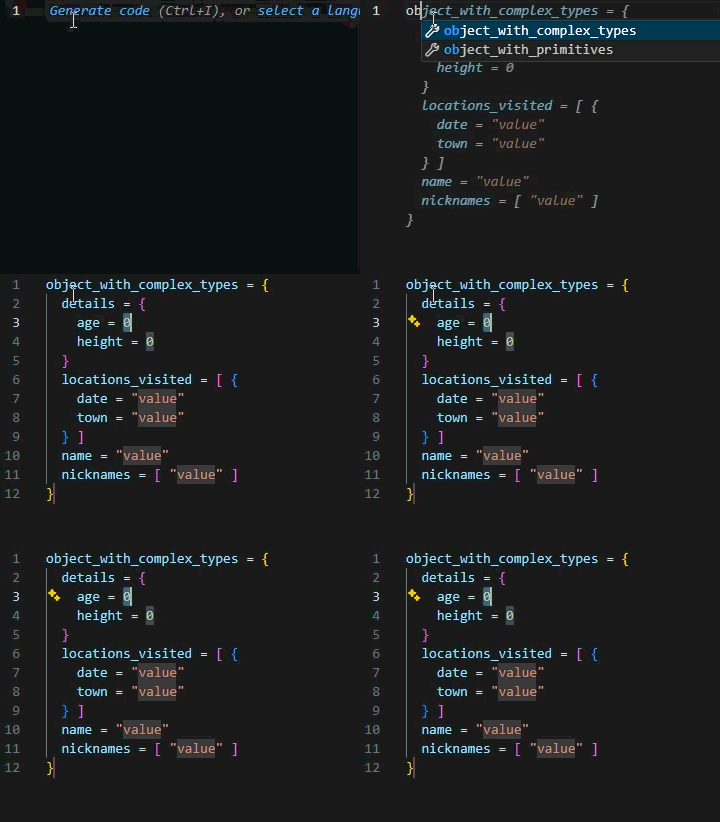
Check out these examples to see what basic object variables look like:
Example 1 - object of strings
variable "simple_object" {
  type = object({
    name          = string
    age           = number
    height        = number
    town_of_birth = string
  })
  default = {
    age           = 54
    height        = 172
    name          = "Bob"
    town_of_birth = "Bob Town"
  }
}
and it’s JSON representation:
{
  "age": 54,
  "height": 172,
  "name": "Bob",
  "town_of_birth": "Bob Town"
}
Examples of accessing values for var.simple_object:
var.simple_object.namewould returnBobvar.simple_object.heightwould return172
Example 2 - object with complex types
Now this one is a little more interesting! We’re combining some of the previous types we’ve seen into a single variable.
variable "complex_object" {
  type = object({
    name      = string
    nicknames = list(string)
    details = object({
      age    = number
      height = number
    })
    locations_visited = list(object({
      date = string
      town = string
    }))
  })
  default = {
    name      = "Bob"
    nicknames = ["Bobby", "Bobster"]
    details = {
      age    = 54
      height = 172
    }
    locations_visited = [
      {
        date = "2023-01-01"
        town = "Bob Town"
      },
      {
        date = "2023-06-01"
        town = "Alice City"
      }
    ]
  }
}
and it’s JSON representation:
{
  "name": "Bob",
  "nicknames": ["Bobby", "Bobster"],
  "details": {
    "age": 54,
    "height": 172
  },
  "locations_visited": [
    { "date": "2023-01-01", "town": "Bob Town" },
    { "date": "2023-06-01", "town": "Alice City" }
  ]
}
Examples of accessing values for var.complex_object:
var.complex_object.namewould returnBobvar.complex_object.nicknames[1]would returnBobstervar.complex_object.details.agewould return54var.complex_object.location_visited[1].townwould returnAlice City
Tuples#
Alright! Finally we get to see what was going on with the tuple([string, string, string,]) up in the inferred types (implicit) section.
Tuples are a bit of a catch all; very flexible but it would be uncommon, dare I say not recommended, to explicitly declare variables as tuple types. The ones we’ve already reviewed would likely be better choices. Tuples mostly appear on intermediate variables, such as the ones declared in the locals {} blocks.
That said, some neat facts about tuples are:
- They’re ordered, similar to lists
- They’re heterogeneous, i.e. they can have elements of different types; unlike lists and sets which are homogeneous where all elements must be the same type
- They must have the same number of schema and elements - e.g. a
tuple([string])type can be given a value of["first"], but not["first", "second"] - Anything declared in a
locals {}block where the expression uses[]will be a tuple unless you precede it with a type conversion function such astolist([]) - Tuples can be joined together using the concat() function but results may vary depending on the complexity of the tuple
- Tuple values can be accessed using:
- index lookup syntax:
var.my_tuple[<index number>] - element() function lookup:
element(var.my_tuple, <index number>)
- index lookup syntax:
Check out this example to see what a basic tuple variable looks like:
Example - mixed tuple
variable "my_tuple" {
  type        = tuple([string, number, bool])
  description = "A tuple with a string, a number, and a boolean"
  default     = ["example", 42, true]
}
and it’s JSON representation:
[ "example", 42, true ]Examples of accessing values for var.my_tuple:
var.my_tuple[0]would returnexampleelement(var.my_tuple, 1)would return42
and as a bonus, when we use the type() function available in the terraform console (more on that in another post), we can see it knows these are all different types:
> type(["example", 42, true])

tuple([
    string,
    number,
    bool,
])
What’s all this about?#
You made it! Hopefully you found some of that interesting, and you may be wondering why bother with all this theory stuff..
Firstly, these things will come up a lot in Terraform (and other languages) and are generally considered essential foundational knowledge - you’ll save yourself a lot of time by becoming familiar with these concepts.
Secondly, as we start to shift from creating one resources (singular) to N resources (multiple) we will be using the for expression and the for_each meta-argument, the latter of which can iterate (loop) over a map type.
As we learned about maps, they have keys! Whenever you use for_each, keys are going to be involved (whether you like it or not). We’ll explore this more in another post, but when you start referencing values from different resources you do so with the key, such as azurerm_resource_group.this["rg_one"].id and azurerm_resource_group.this["rg_two"].id which reference the Azure resource ids for two different resource groups deployed by the same resource block.
Not only does understanding the keys help with looping and references, it also flows into how the resources can be organised in the state file - which is also something for another time.
Wrapping up & what’s next?#
We’ve covered quite a lot in this post, nice work for sticking with it. We’re learned about primitive and complex data types and what the shape of them looks like.
We’ve learned that although list, set, and tuple types all use square brackets [] it doesn’t mean they’re the same thing, and each type has it’s own behaviours; the same goes for object and map with {}.
We’re gone over explicit/strong typing and how we can declare types on Terraform variable blocks, or use the type conversion functions within locals blocks to be more explicit. We touched on the B-side of this, being implicit/inferred typing where Terraform will make some assumptions on values created in locals, and also when it performs automatic type conversion behind the scenes.
We’ve learned how to refer to specific values/keys/indexes using syntax or the element() and lookup() functions, along with joining types together with the merge(), concat(), and setunion() Terraform language functions.
In data types part 2 we’ll dig a little deeper into type constraints and conversions. Until next time, stay curious.