
A few years ago I was working on migrating a workload from one Azure subscription to another. Our migration strategy in this instance was to deploy the infrastructure & code to the new subscription with the requirement it would be dormant until we were ready to move forward.
Dormant means we didn’t want it accepting traffic or processing anything until we were ready. Given the workload connected to several other services (dependencies), such as an Azure SQL database and an event bus, I configured some dummy connection strings so the application wouldn’t be able to connect to anything.
The Unfolding of Events#
It’s Friday afternoon and we’re feeling good; time to roll out that new infrastructure which shouldn’t change anything, congratulate ourselves on a job well done, and ease ourselves into the weekend.
Monday morning comes around and we get wind of a production defect in a completely separate system to the one we’re migrating - dead letters in our event bus queues due to huh, that’s weird, failed SQL logins (Login failed for user '<token-identified principal>'). We started following breadcrumbs and raised a support ticket on the side, it never hurts to make Microsoft earn their support money 😉.
Microsoft come back to us fairly quickly and said the error was caused by too many failed login attempts which had triggered something called DoSGuard which blocked the originating IP address.
We ran the below query(sourced from Microsoft docs1) on the SQL server’s master database and it showed a dramatic increase in failed logins from around Friday afternoon when we deployed the supposedly dormant infrastructure.
Info
SELECT start_time, end_time, event_category,
	event_type, event_subtype, event_subtype_desc, severity,
	event_count, description
FROM sys.event_log
WHERE event_type = 'connection_failed'
    AND event_subtype = 4
    AND start_time >= '2026-01-30 00:00:00'
    AND end_time <= '2026-02-02 00:00:00';
At this point I’m still thinking ‘correlation does not imply causation’ and I was stuck on:
- Why did the login failures match up with the infrastructure deployment when I was sure I had stripped out the connection strings?
- Even if it was related, why would it be affecting a different system?
The first question was an easy one, eventually I realised I’d simply missed a connection string. One of the components had the SQL connection string configured as an Azure Bicep parameter which was a deviation from the other components.
This oversight meant the component had been reaching out since Friday afternoon, knocking on the SQL door trying to get in before any access had been granted to the managed identity of the web app.
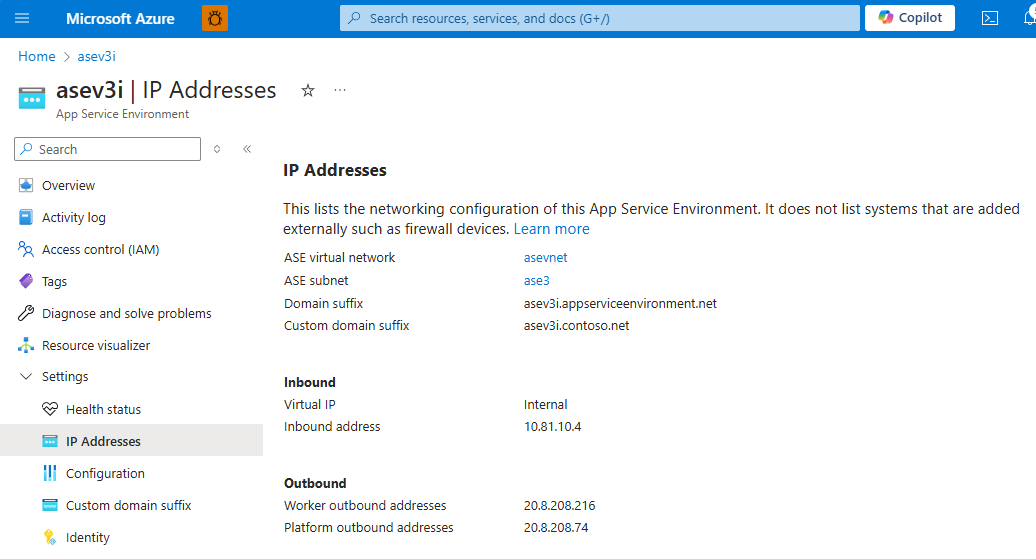
For the second question, the dots finally started connecting when Microsoft provided the IP address that was being blocked and we quickly understood the problem - the workload was running on a compute/networking resource called an App Service Environment (ASE) which hosted multiple workloads.
If we have a quick look at the networking for an ASE we can see that the application workloads all use a single outbound IP address:
So now finally, all the pieces have fallen into place:
- A workload had been deployed to a shared compute/networking resource
- That workload was not expected to ‘do’ anything, but one component was still configured with a valid SQL connection string
- The component bombarded our SQL server with login attempts, triggering DoSGuard against the originating IP which was shared by multiple workloads
- Other systems attempting to access SQL were being denied which affected their operation and led to the opening of the aforementioned dead-letter incident
Mitigation with a serving of humble pie#
The immediate mitigation was to turn off the web app which was harassing the SQL server, removing the source of the failed logins and allowing other systems to get on with their business.
Just to be sure, we re-deployed the application with a fake connection string until we were ready to pick up the migration.
Having learned about the built-in security feature first-hand we wrote a small memo for the wider engineering team to consider in case someone else hit the same issue.
Although making mistakes is a part of life it can be really hard to not beat yourself up when you’re the one that overlooked something. I’ve often struggled with this but over the years I’m slowly re-framing the concept of failure and shifting it towards being a lesson learned and a stepping stone to future successes.
The migration was completed later in the week, and there was much rejoicing.
Additional reading#
DoSGuard#
Although Microsoft didn’t provide exact figures for the DoSGuard trigger (just ’too many in a given period’), they did say that once triggered the block time was 5 minutes.
- https://techcommunity.microsoft.com/blog/azuredbsupport/connections-rejected-by-dosguard-error-18456-state-113/3775487
- https://learn.microsoft.com/en-us/azure/security/fundamentals/infrastructure-sql#dosguard